How can I redirect respondents to another webpage after submitting the google form?
"redirect a respondant of google forms to another website after sending the answers?"- Google Docs Editors Community
This is a common question from Google Forms users and 190 people on Google's forum have asked about it. For example, if a research institute runs your survey and wants people sent to its Thank You Page, you can't go live without that. Google Forms only lets you customize the confirmation message shown after submit. You can paste the URL in that message, but it is passive and relies on the user to follow through. With Formfacade, you can redirect users automatically to another webpage, so they land on your page as soon as they submit. Even better, you can show a different page or message for each answer.
Let's start. Create your form and follow the steps below.
Why redirect after submit?
A thank you message acts as an acknowledgement and provides an opportunity to guide the user towards next steps. For example, when the user submits a lead magnet form, you can show a brief note and the link to download the report or ebook they signed up for. The limitation with adding a link is that it is passive and relies on the user to follow through.
While this might work well for some use cases, it can make a real difference in high-intent workflows. For example, when a prospect submits a contact or qualification form, redirecting them directly to your calendar lets them book a call while their interest is still high, instead of leaving them to track down the scheduling link later or in the thank you message. Every manual step between submit and the next action is a place where people drop off, so removing that step turns more submissions into downloads, meetings and completed conversions.
Method 1: Add a link in the confirmation message
Google Forms allows you to customize the message displayed after submit. You can update it to paste the URL, which will be displayed as a link in the confirmation message.
- Open your form in Google Forms, then click Settings.
- On the Settings page, expand the Presentation section.
- Click Edit for the Confirmation message option.
- Enter the message along with the URL and click Save.
This is a native Google Forms feature and is free. While this is not a true redirect, it is useful for low-stakes forms.
Limitations
- Not a true redirect.
- Static link only; form responses cannot be passed via the URL.
- No custom link text. The full URL is shown as pasted, with no option for anchor text like "click here."
Method 2: Redirect automatically using Formfacade
- On the page that opens, name your form, click Build form and click Proceed. It can take about a minute.
- You will land on the form's "Preview" tab.
- Click on "Edit" tab

- Scroll down to the end of the form and click on the gear icon on the last "After page" row. It says "After page 1" on a form with one page. The panel can take a few seconds to open, so click once.
- If it asks "Button not configured!", click No.
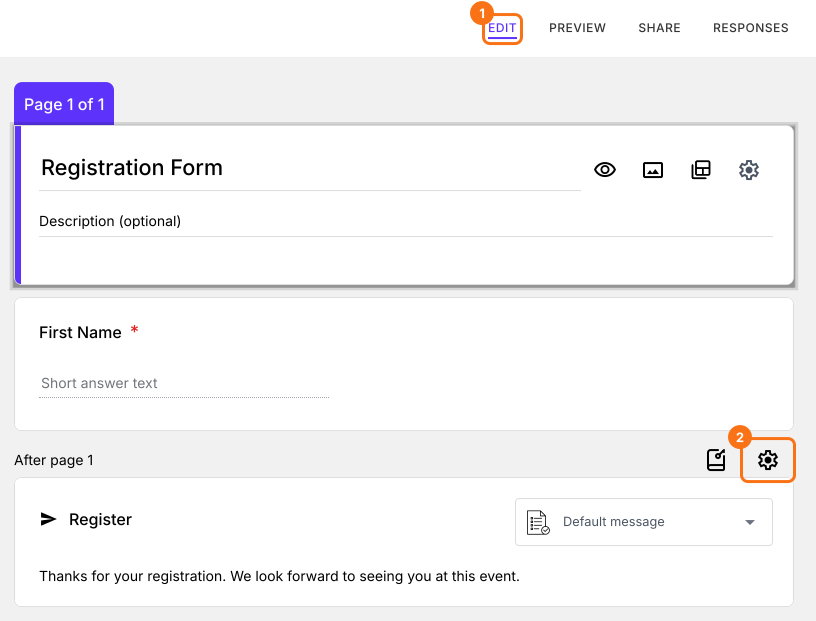
- Click On submit
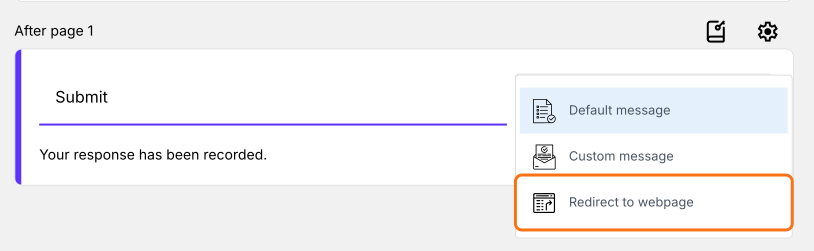
- Select Redirect to a webpage
- Paste the url and click Save
You can also click on the Submit card at the end of the form, select Redirect to webpage and paste the url.
- Click on "Share" tab and click Open
- Submit a response to test the redirect. You will land on your webpage.
Why Formfacade
- Automatic redirect on submit.
- Pass answers to the redirected webpage.
- Redirect to different pages based on answers.
- Responses stay in the Responses tab. Click Submit to Google Forms to send new responses to Google Forms. Click Link to Sheets to create a Google Sheet, then click Sync to Sheets to bring new responses into it.
Limitations
- Requires a subscription, compared to the free Google Forms option.
- Must use the Formfacade share link or embed code to collect responses, instead of the native Google Forms link.
How to show a different page or message for each answer?
- In the same On submit tab, select Redirect to a webpage and leave the url box empty
- Click Try advanced redirects
- Describe where each answer should go and click the Generate button. For example: Send people whose Department is QA to https://www.example.com/qa with their name in the URL, everyone else to https://www.example.com/other
- The box will be filled in with the redirect. Click Save.
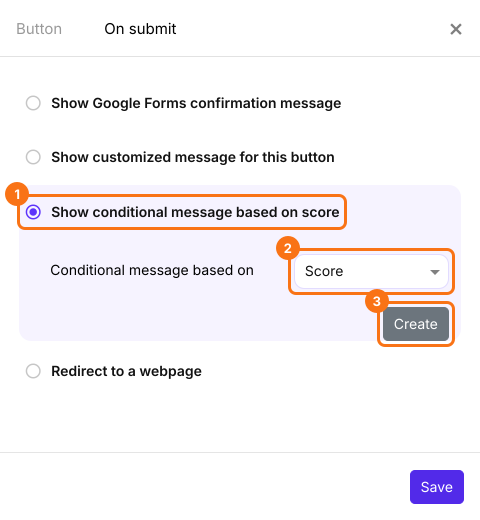
To show a different message for each answer, give each answer its own points using Formfacade - Assign points, because the message is chosen by the score. In the Edit tab, click on the gear icon on the last "After page" row. Click On submit. Select Show conditional message based on score. Select the score field and click Create. Click on the first condition, update the condition, enter a message and click Save. Click on + Condition to add another message. Once you have added all the messages, click Save. Read How to add a verbal assessment based on the calculated score?
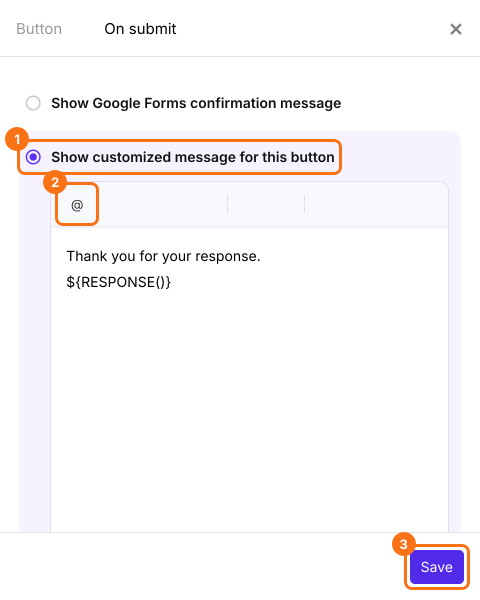
To show the same message with their answers on any form, select Show customized message for this button instead. Click @, select Response or a field to add their answer to the message and click Save.
Frequently Asked Questions
Can Google Forms redirect automatically after submit?
No. Google Forms only lets you customize the confirmation message shown after submission. For an automatic redirect you need an add-on such as Formfacade.
Can I redirect using Apps Script?
No. An "on form submit" trigger in Apps Script runs server-side after the response is recorded, so it can send emails or update a sheet, but it cannot control the respondent's browser or send them to another page.
Can I redirect by embedding the Google Form?
Only on a page you control. If you embed the form on your own site, you can add JavaScript that redirects after submit (by counting page loads), but it will not work well for multi-page forms, works only on your own page and needs ongoing maintenance.
Is "Go to section based on answer" the same as a redirect?
No. Google Forms' "Go to section based on answer" routes respondents to a different section within the same form, which is useful for branching questions, but it can't send them to an external webpage after they submit.
Can I redirect to a different page based on the answer?
Yes, with Formfacade. You can route respondents to different pages based on their answer, for example sending qualified leads to a booking page and everyone else to a resource page.
Can I pass the form answers to the page I redirect to?
Yes, with Formfacade. You can append form responses to the redirect URL as parameters, so the destination page can personalize content or prefill a second form. Avoid passing sensitive or personal data this way, since URL parameters are visible in the address bar.
Summary
If people have to reach your thank you page after a form, a link in the Google Forms confirmation message relies on them to click it. With Formfacade, you set a redirect and people go to your page as soon as they submit. Create your form and complete the steps above. If you have any questions, write to support.
Last updated: