How can I change the layout of my Google Forms?
"How to make google form more compact?"- Google Docs Editors Community
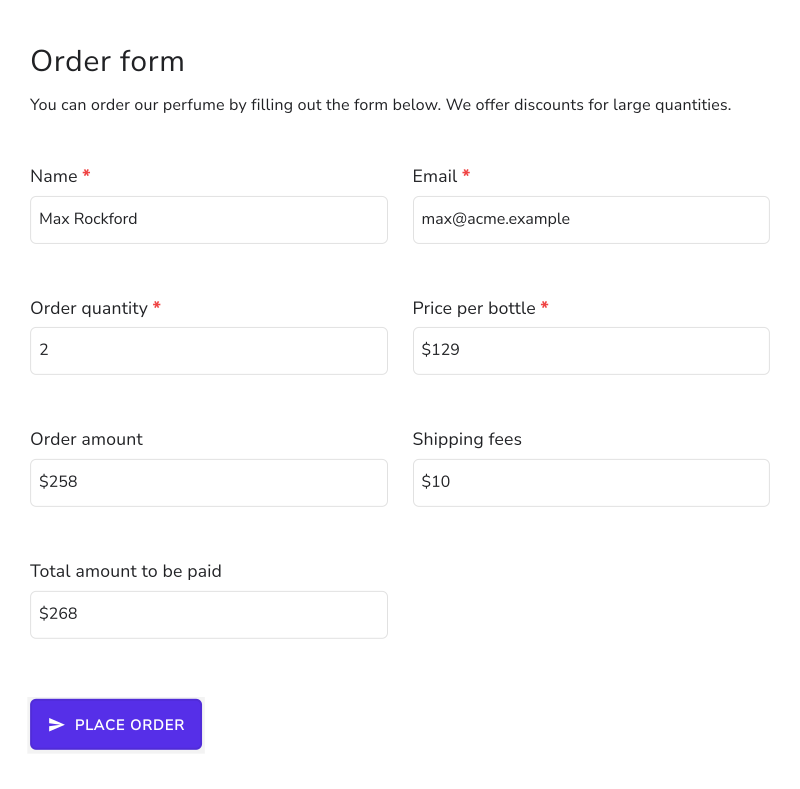
In Google Forms, every question sits on its own card in one narrow column, with space around each one. On a long order or registration form, people scroll a long way to reach Submit. Google Forms lets you change the theme but not how the questions are laid out, and its embed code only sets the width and height. With Formfacade, you choose a Default, Comfortable or Compact layout for each form, so your users see more questions at a glance. The responses are still collected in your Google Form.
Import your Google Form and follow the steps below.
How to change the form layout?
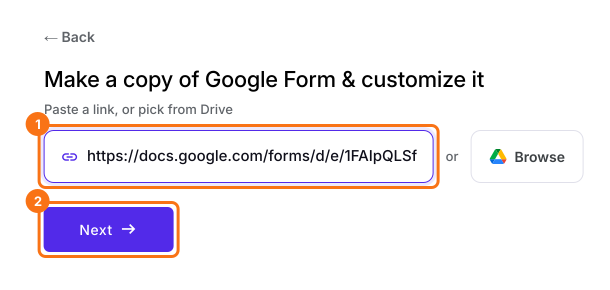
- On the page that opens, paste your Google Form's link or click Browse to pick it, then click Next.
- When it asks you to choose a layout, pick Compact, Comfortable or Default. Click Proceed and your form opens in a new browser tab with that layout.
- You can also change the layout on the "Preview" tab: click More settings, which opens your form there in another browser tab. Then click on the LAYOUT tab.
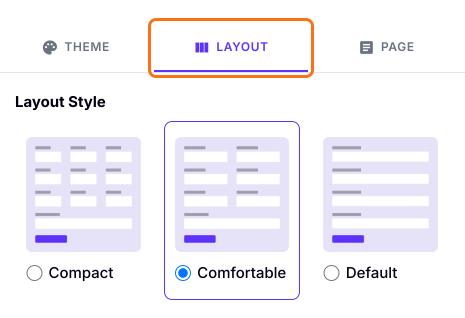
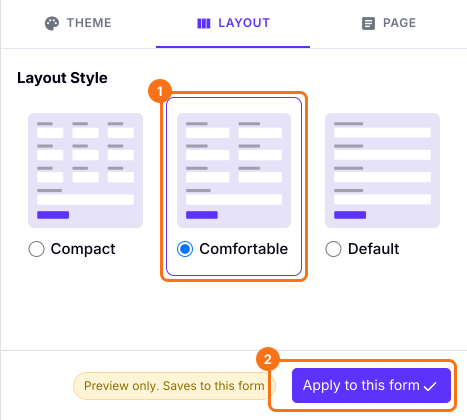
- Select the desired layout.
- Click on the "Apply to this form" button. A layout applies only to this form.
Summary
Change the layout of your Google Form. Show more at a glance.
Import your Google Form, pick Comfortable or Compact when it asks you to choose a layout and click Proceed, so people see more questions at a glance.