This is a common question from small businesses moving their orders online. For example, if you take orders on printed forms or by phone, they cannot show your products or collect payments and every order takes your time. A Google Form is free and quick to start, but it can't add up a total and a form that leaves out a delivery detail or a total only moves the work back to you. With Neartail, your order form can have your categories, products, delivery details, cart and payment on one form. Your customers see what you sell and what they owe before they order. Even better, the form will have your own branding instead of Google's. This complete guide shows you what to ask.
Let's start. Read through this guide, then create your order form.
The lockdowns and social distancing have much changed the world and the consumers have quickly moved to online ordering. Starting from groceries, fresh farm produce, restaurant food to ordering meat, school stationery and pre-ordering at your kid's school canteen, have all gone online. This is the best time ever for your small business to hatch out from your printed order forms and phone orders. Now you need to showcase your products, accept orders and collect payments - all ONLINE!
Keep reading this complete guide on how to get started and help yourself make a decision on what to ask in your order form.
If you have already started your search around the internet, it is possible that you had been taken for a spin. There are a span of solutions, starting from ecommerce store, creating websites or to get started with ready-made order form templates offered by every other form builder. It depends on what you are selling and where your customers are. But in most cases, what you will need is to get started with an online order form and share it with your existing customer base and start selling. Unless you are looking for acquiring new customers, you don't need to spend your time and money creating a website of your own or to create an ecommerce store.

In your physical store you are available in-person to guide your users for their purchase. But when you are selling online, your online form must do this for you. A well-organized, simple to navigate form will make it easy for your customers to place their order and make payments right away.
So, your customers' comfort should be your priority while designing your online order form.
There are two ways to get started. You can pick an order form template and customize it to your needs or design one from scratch. In any case, you should keep the focus on making the lives of your customers simple and address these 5 needs:
1. Neatly organize and showcase your products/services with nice pictures
2. Group products by categories/types to make your list well-structured, for easy navigation
3. Let your users choose the products, quantity they want to complete their order
4. Allow them to enter delivery details, review their cart, view total amount and delivery fees (sales tax, discounts, etc)
5. Provide them with one or more payment options to enable them pay online or within the form using their credit card
A complete order form format should consist of these 7 sections. Read on to know what to have in your order form.
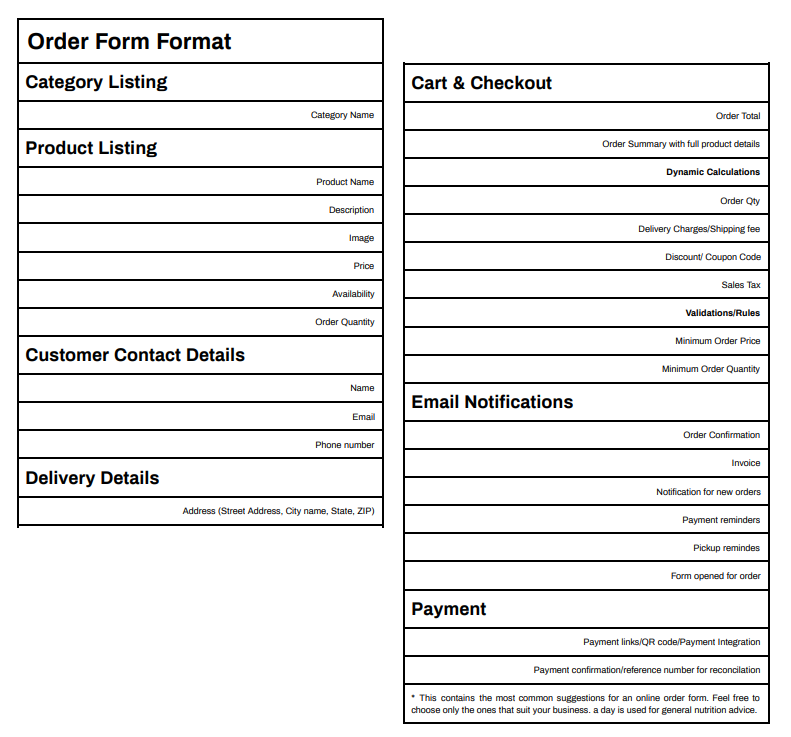
When you have a lot of products to offer, it is always good to sort them into categories. This will not only keep your form organized, but also let your users navigate within and between categories to choose what they need.
Here is where your users will want to see the products that you offer and much more details about it:
- Product name
- Description and details of packaging etc
- Price in the correct currency format
- Product Image
- Bullet point descriptors (reminder of what they're buying and why)
You need to capture their contact information. At a minimum, the fields you want to have are:
- First Name
- Last Name
- Email Address
- Phone number
If you provide the delivery option, you will ask them for their delivery address with
- Door number
- Street Address
- City Name
- State
- Zip
- Country (if selling outside of your home land)
Sometimes if you need to calculate a delivery fee, you may want to group the cities and towns of your delivery area into zones. Then, you need to ask your customers to choose the zone the delivery address falls under.
You may have listed all your products one by one on a single page order form. Yet, showing your customers their order total, list of items and the quantity they ordered is absolutely essential. The ability to review their order will let them proceed with confirming the order and making a payment ahead.
Dynamic calculations
Here is a list of automatic calculations you need to have on your order form. Ideal, if the totals can change dynamically, as your customers keep adding products to the cart.
- Order Total
- Order Summary with full product details
- Order Quantity re-calculation (especially for the grocery businesses when the fruits and vegetables are sometimes sold by weight rather than by unit)
- Delivery Charges/Shipping fee
- Discount/ Coupon Code
- Sales Tax
Validations
Sometimes, your business requires a minimum order price or quantity to justify the logistical arrangements you have to make for a delivery. So, you need to have the validations in place to enforce the logic in your order form.
- Minimum Order Price
- Minimum Order Quantity
At this point, your customers have verified their orders and are well aware of the amount including delivery fee, tax etc. They are now ready to pay. Are you ready to let them make their payment securely? What payment options do you have for them? Yes. These are the only two questions you need to answer well for them.
Give your customers the opportunity to pay for their order by choosing one of the multiple payment gateways offered in your form. Sometimes you may want to add a payment link to your form. Or you may want to add QR codes of your digital wallets, to let them pay easily from their mobile.
In any case you need to have the following fields and clear instructions on how to complete their payment:
- Payment link/QR code/Payment gateway integration
- A question to ask the payment reference code or details. Remember, you need to have a clear process for Order-payment reconciliation.
Online forms need not be always one-way by just taking in your customers' inputs. You need to have continuous communication with your customers until their orders reach their hands. Sending an order confirmation via email is a bare minimum to start with. Here are some more touch points where you can send them email notifications:
- Send yourself a notification when a new order arrives
- Order Confirmation to your customers
- Invoice/Bill
- Payment Reminders
- Pickup reminders
- Notify when you are ready to accept new orders for the next season
Now with this clear idea on what to ask and what to show for your customers, you are now ready to choose the right order form template or create one of your own.
To make the selection process easier, check our
gallery for some templates for your business, which have all these elements.
Google Forms are considered the best for taking survey, quiz, but there are so many reasons that make Google Form one of the most popular for creating order forms too. So, there is a good chance that you have already built your order form with this free tool. Sure, you liked the convenience of collecting all your orders in Google Sheets.
Yet, the things you cannot do in the order form format above with your Google Form are:
- Setting up Cart & checkout functionalities with dynamic total calculations and validations
- Payment integrations
- Configuring Email notifications
To overcome these drawbacks of Google Forms, you can create your order form with Neartail, which has all of these.
If you are moving from printed forms and phone orders, you need to decide what your online order form asks and shows. A complete order form has your categories, products, contact and delivery details, cart and checkout, payment and email notifications.
Create your order form and start with these.