How to add videos in Google Forms?
This is a common question from Google Forms users who want people to watch a short video inside the form. A video may explain your product or your question better than words. Google Forms does not let you upload a video file directly and it only takes a YouTube video. Sending people off to another page with a link means some of them may not come back. With Formfacade, you can open your form in Google Forms from the Edit tab and use the YouTube url to add the video there. Your users can watch it right on your form. Even better, you can embed that form on your website, so they watch it on your own page.
Let's start. Create your form and follow the steps below.
How to open your form in Google Forms?
- On the page that opens, name your form, click Embed form and click Proceed. It can take about a minute.
- You will land on the form's "Share" tab, on Embed. The top bar may say "Blank Formfacade form" until you reload the page.
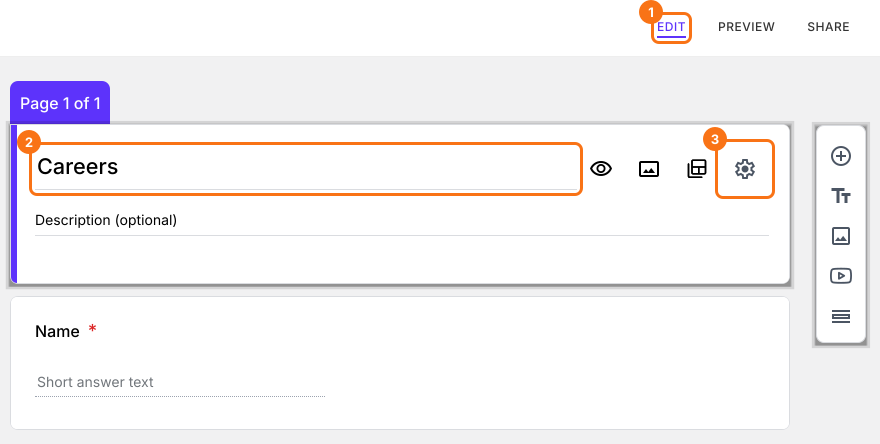
- Click on "Edit" tab

- Click on the form's title
- Click on the ⚙️ icon on the title card
- Click on the Advanced tab
- Click Launch next to "Edit this form with Google Forms"
- Your form will open in Google Forms in a new tab
You can upload your video to YouTube and use the YouTube url to add the video in your Google Forms.
Add YouTube video
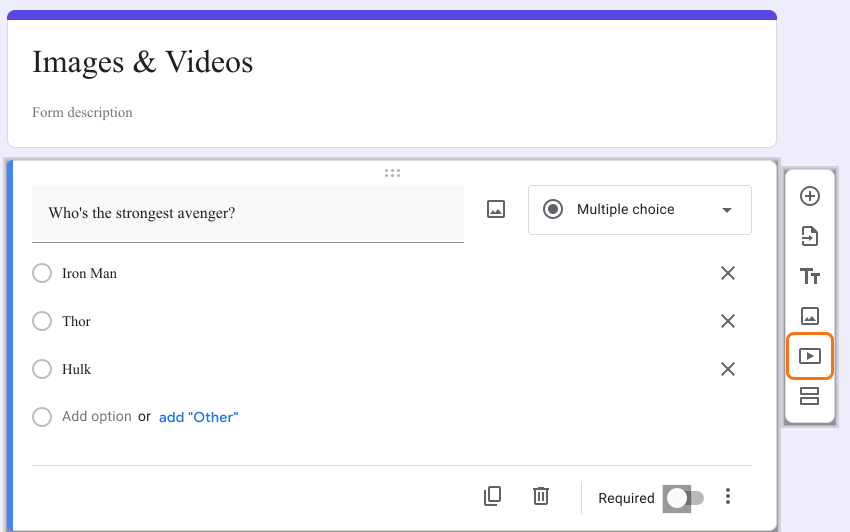
- Click on Add Video icon as shown below
- Paste the YouTube url or use search to add video
- If required, add a video title
Your change will reach your form when you go back to Formfacade and open the "Edit" tab again. If it is already open, reload the page. If you do not see the change, wait a few seconds and reload it again. Formfacade reads your Google Form again each time you open it there.
Summary
If a video explains your question better than words, a link sends people away from your form. With Formfacade, you open your form in Google Forms with Launch, upload your video to YouTube, click on Add Video icon and paste the YouTube url. Create your form and complete the steps above. If you have any questions, write to support.
Last updated: