How to embed Google Forms in your React app without an iframe?
This is a common question from React developers who want a form in their app. Google's embed code puts an iframe in your page, with its own look and its own scroll bar. You can't style it from your app. You want the form to sit in your app like any other component. With Formfacade, you can embed the Google Forms on your react app without an iframe, using the Formfacade embed package. Your users will see the form as part of your app and not as a Google page inside it. Even better, you keep building the form in the editor and the responses are collected on your Google Forms, so changing a question does not mean changing your code.
Let's start. Create your form and follow the steps below.
Pre-requisites
Create a React app
If you haven't setup your React environment, install the node.js and create a react app.
Step 1: Click here to download node.js
Step 2: Install NPX globally by running the following command on your terminal.
npm install -g npx
Step 3: Generate a react app
npx create-react-app test-react-app
Install Formfacade/embed-react
Formfacade/embed-react is the Formfacade embed library to embed Google Forms in your React app without an iframe.
In your app directory, open the terminal and install the Formfacade Embed package:
npm install @formfacade/embed-react
Embed Google Forms in React app
- On the page that opens, name your form, click Embed form and click Proceed. It can take about a minute.
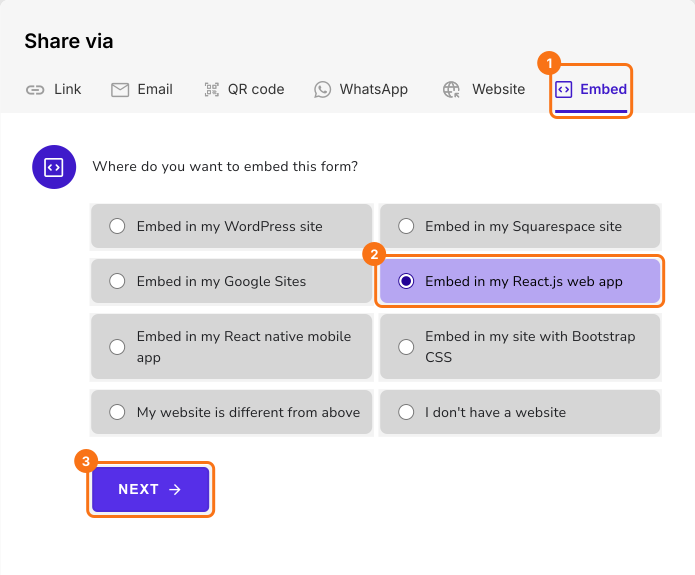
- You will land on the form's "Share" tab, on Embed. The top bar may say "Blank Formfacade form" until you reload the page.
- After a few seconds, "Where do you want to embed this form?" will be displayed
- Select Embed in my React.js web app, click Next
- Include the import statement below to import the Formfacade Embed component in your React app: import FormfacadeEmbed from "@formfacade/embed-react";
- Add the Formfacade Embed code in your react app: <FormfacadeEmbed formFacadeURL="https://formfacade.com/.../classic.js/?div=ff-compose" onSubmitForm={() => console.log('Form submitted')} />
- Copy this code from the Embed tab, as it has your form's url in place of the dots.
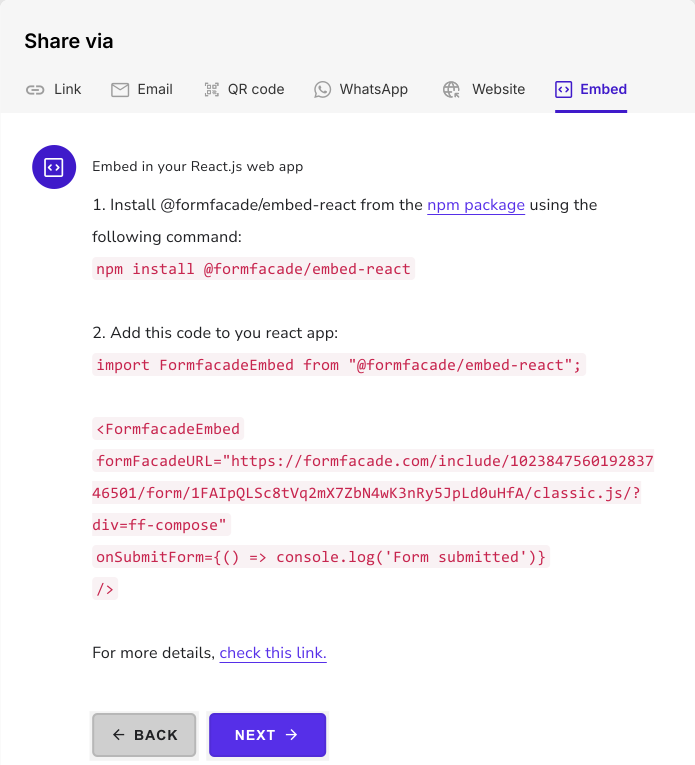
Your form will show in your React app without an iframe.
Summary
If you embed a Google Form in React with Google's code, you get an iframe with its own look and scroll bar. With Formfacade, you install @formfacade/embed-react and add the Formfacade Embed code in your react app. Create your form and complete the steps above. If you have any questions, write to support.
Last updated: