How to personalize the thank you message in your form?
This is a common question from people who take payments on a form and want buyers to see that their order went through. Google Forms lets you write a confirmation message, but it shows the same one to everyone, with no name and no order details. It cannot use the person's answers, so everybody reads the same plain line. With Neartail, you can format the text and also include form responses to show a personalized thank you message. Each user sees their own answers in the message when they submit the form. Even better, that message shows on your own branded page instead of Google's.
Let's start. Create your form and follow the steps below.
How to personalize the thank you message?
- On the page that opens, click "Enter your form name". Type your form's name, click Generate and wait about a minute.
- Check the outline it suggests and click Proceed.
- Once you create the form, you will land on the form's "Edit" tab.
- If it asks "Do you want to collect payment on form submit?", click No.

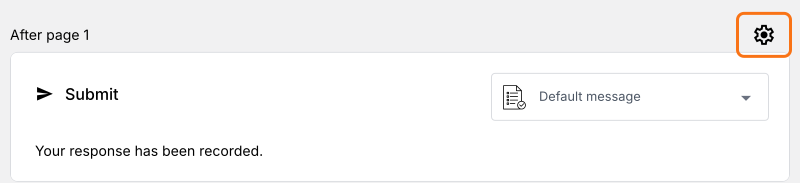
- Click on the gear icon in the last row above the Submit button. It is the last After page row or the After payment row if your form takes payment.
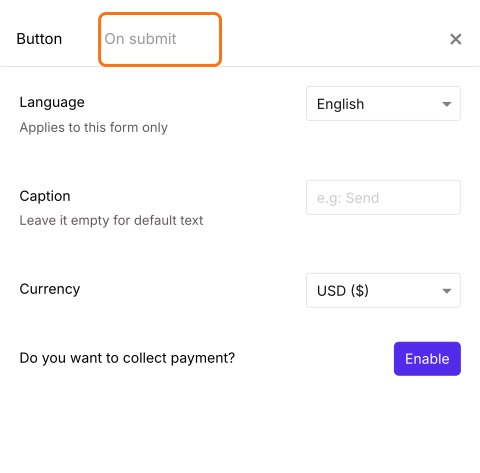
- Button settings will be displayed. Click On submit.
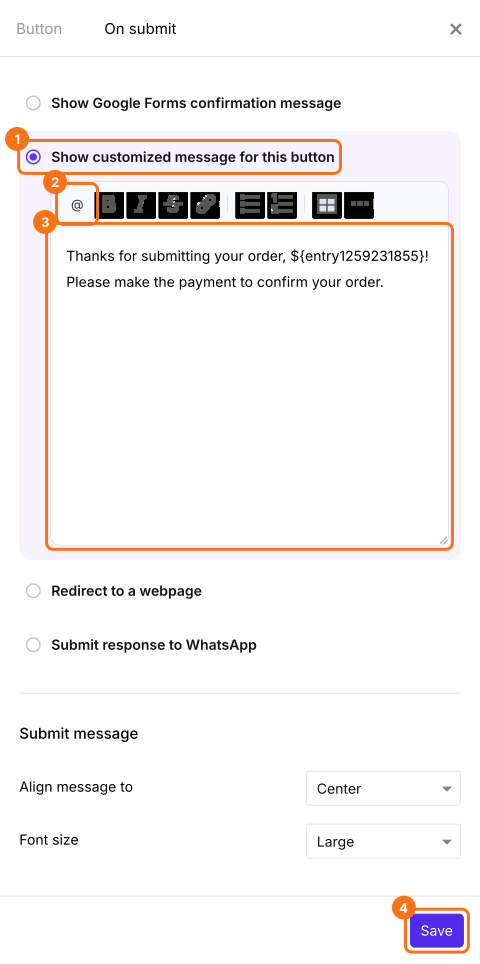
- Select Show customized message for this button. Enter the thank you message and click Save. You can use the @ option to include form responses and personalize the thank you message. It shows as a code here. That is right and your user sees their answer.
When a user submits the form, they will see this message with their own answers in it.
Summary
If everyone sees the same confirmation message, a Google Form cannot use their answers to personalize it. With Neartail, you format the text and include form responses and each user sees a personalized thank you message. Create your form and complete the steps above.
Last updated: