How to stop email notifications?
"How can I stop email notifications to respondents"- Support forum
This is a common question from small businesses who have set up emails for their orders. You may have stopped taking orders for a while or moved to another way of telling your customers. Google Forms does not know about these emails, so its settings cannot stop them. You can stop these emails by deleting the notification, as shown below.
How to stop the emails from your form?
- In your form, click on "Orders" tab

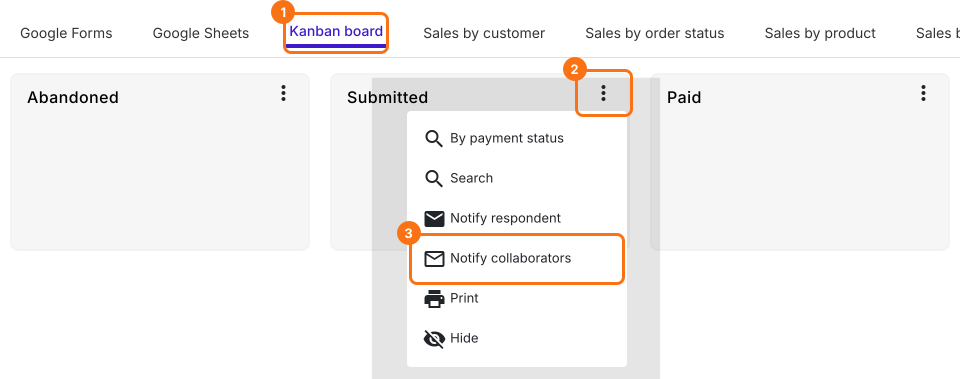
- Click Kanban board, click the ⋮ on Submitted and select Notify collaborators
- Your email setup will be displayed. Click the red Delete button
- In the "Are you sure you want to delete this collaborator notification?" popup, click Yes
- It says "Collaborator notification deleted successfully"
To stop the email to your customers, do the same with Notify respondent.
The next order will not send this email.
How to stop the emails you set up with the add-on?
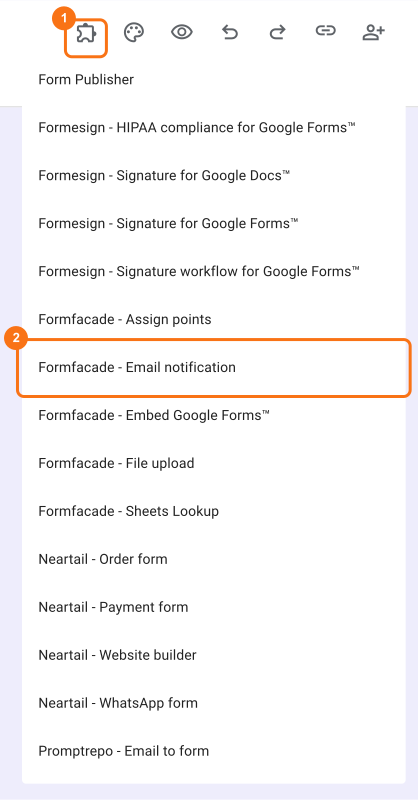
- Open your Google Forms, click on the addon icon and select "Formfacade - Email notification". If you haven't installed the add-on yet, you can install it from Google Workspace Marketplace using this link
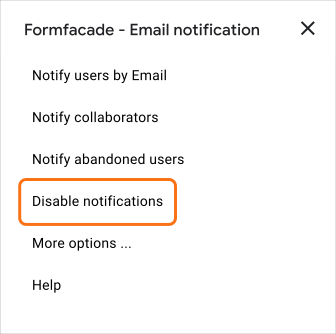
- Formfacade - Email notification popup menu will be displayed. Select "Disable notifications" to stop Formfacade - Email notification emails. In the "Delete email configuration too?" popup, click No to keep the subject and message for later or Yes to delete them
- A popup confirmation message with the number of disabled email triggers will be displayed
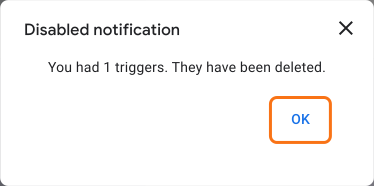
Important: When you use this disable option, all confirmation and notification emails setup using this account will be stopped.
Summary
If you no longer want these emails to go out, the settings in Google Forms cannot stop them. With Neartail, you open the notification again and delete it and the next order does not send it. If you have any questions, write to support.
Last updated: