How to fix ReferenceError: Computation failed message in email notifications
"Computation failed for Warehouse Team"- Support forum
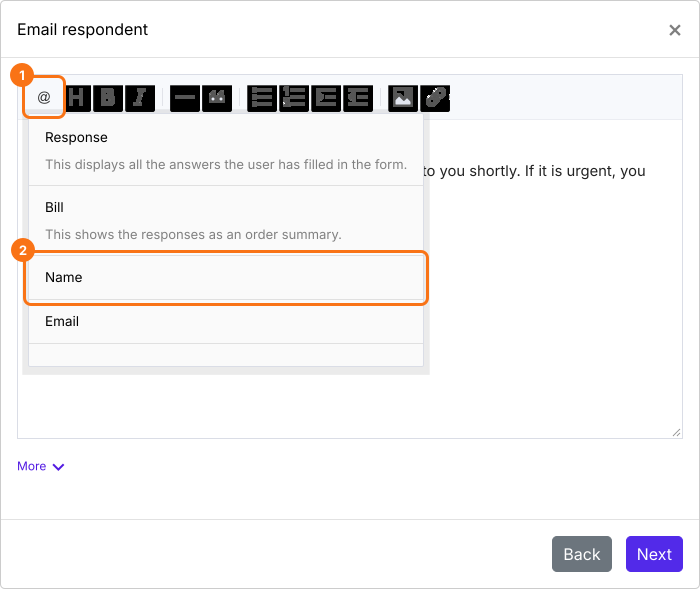
This is a common question from Formfacade users who changed their form after setting up email notifications. If you delete a field from the form, the email message still refers to it. Your customers then receive an email that starts with an error message instead of their name. Computation failed error message is shown if you are using a redundant form field to customize the email message. Please remove that entry#id from the message and use the @ option in the message editor to include the required field.
In the example below, computation failed message is included in the email notification because the entry#id for the name field used in the email content is no longer valid. This can happen if you delete an existing field in the form, but don't update or remove it from the email message template in Formfacade.
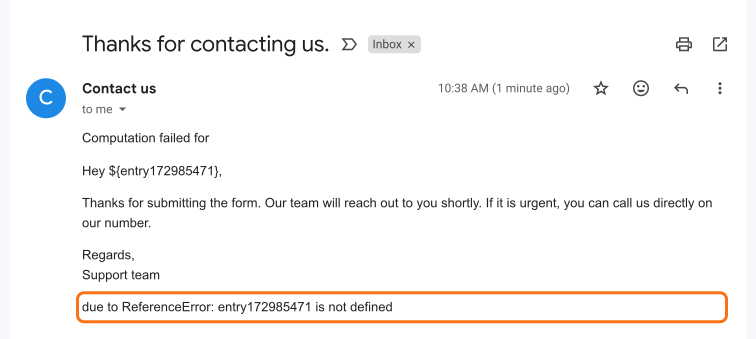
How to fix the computation failed due to ReferenceError issue?
- In your form's dashboard, click on "Responses" tab

- Click Kanban board
- Click on the three dots ⋮ on Submitted
- Click Notify respondent or Notify collaborators, whichever you have set up. Email notifications setup wizard will be displayed. Click Next until you reach the message.
- Delete entry#id for the field that is shown in the error message in the email content.
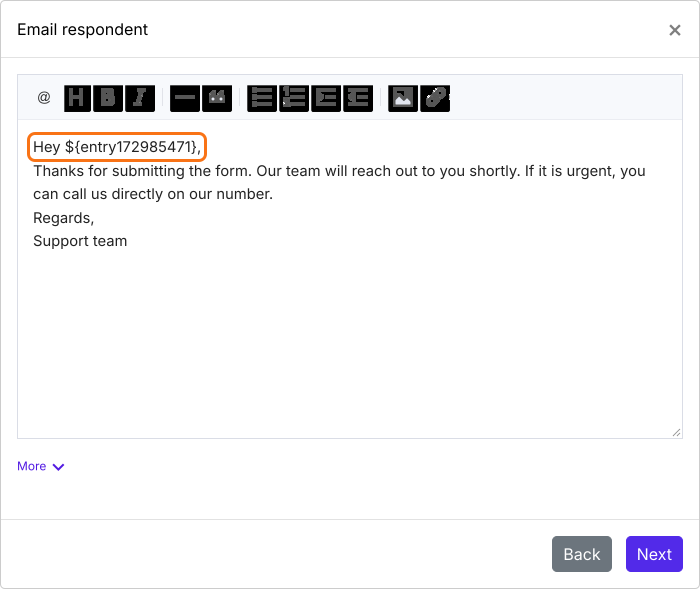
- Use the @ option in the message editor to include the required field as shown in the screenshot below.
- Click Next. Click on "Click here" to open your form in a new tab. Fill it and submit it. If you receive the email, click on the YES button.
Summary
If your email notification shows a computation failed message, the email still refers to a field you have deleted. With Formfacade, you remove that entry#id from the message and use the @ option to include the required field. If you have any questions, write to support.
Last updated: