How to get email notifications for new responses in Google Forms?
This is a common question from Google Forms users who want to know about every new response. Google Forms can send you an email, but the email does not include the response and each person in your team has to turn it on for themselves. With Formfacade, the email shows the form response and you can send it to the other users in your team. Everyone will read the answers right in their inbox. Even better, you can add your own instructions to that email, so your team knows what to do with each response.
Let's start. Open your form in Google Forms and turn it on using the steps below. To get the answers in the email, create your form with Formfacade.
How to enable it in Google Forms?
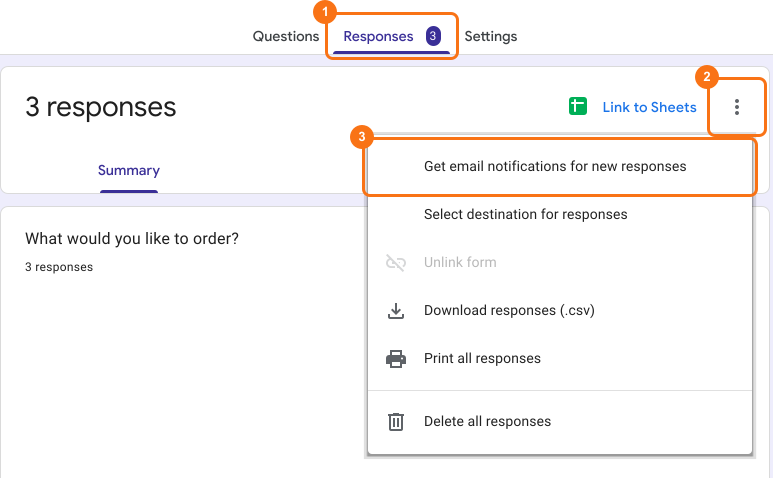
- Open your form in Google Forms
- Click Responses
- Click More ⋮ icon
- Enable Get email notifications for new responses
Limitations in using Google Forms email notifications
- The form responses are not included in these emails. You will have to open the Google Forms to view the response.
- To notify other users in your team, you will have to add them as collaborators in Google Forms and ask them to enable email notifications.
Alternatives: Use Formfacade
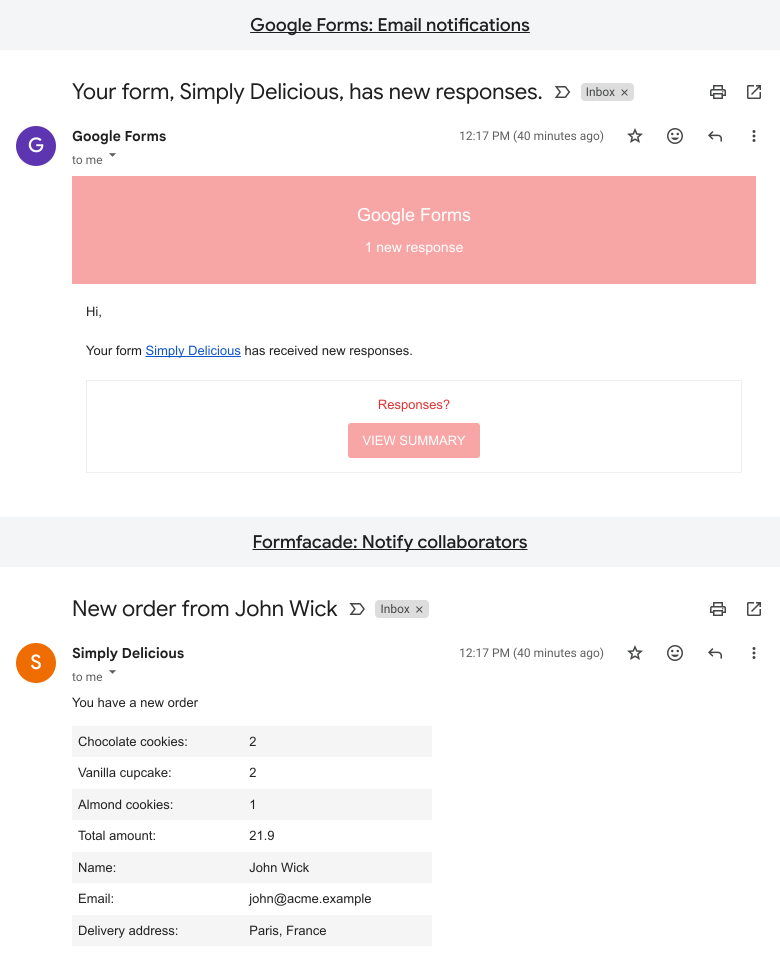
In the image below, the screenshot at the top is that of a notification email sent by Google Forms. It only shows that there is a new response with a link to view the response in Google Forms. The screenshot at the bottom is that of a notification email sent by Formfacade. It shows the form response along with any instructions that you have configured in the email.
To learn how to send customized notification emails using Formfacade, click here.
Summary
If you want an email for every new response, Google Forms can send you one, but without the answers in it. With Formfacade, the email shows the form response and you can send it to the other users in your team. Create your form and send it to your team.
Last updated: